.png)
FAQ
Commonly asked questions and their answers regarding the IxD website / design system.
Default to using the already existing elements available. This helps to maintain consistency across the site. The goal with our design system is to reduce CSS bloat and keep things organized. Please reference the Utility Classes page for a list of classes you can use. You should be able to accomplish what you want by using this as a reference.
If you must create a custom class, use a generic name that can be used across other pages. For example: grid_3col
You can create a custom class when you have 3 or more combo classes to create the desired element. For example, if you find yourself in a similar situation like below, you can create a new specific element. Make sure to follow the naming conventions for custom classes. See next FAQ.
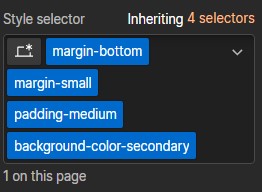
Custom classes use descriptive naming and an underscore "_" to denote the specific element.
For example, if you are creating a custom grid for the how to apply page, you could name it as: "hta_grid". To see a more detailed explanation, visit Client First Classes Strategy.
No, the classes in the design system are not meant to be changed. If you find that you have accidentally changed a class, you can reference the Utility Classes page to revert it back to it's original state.
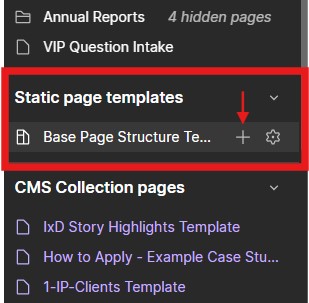
You can use the "Base Page Structure Template" under the Static Page Templates in the left side panel. This will create a page that has the base structure already populated in the page. All you have to do is add the sections, layout, & content.