.png)
Webflow Training
If you're new to Webflow and would like a crash course, follow this learning guide to cover the basics.
Step 1: Webflow 101
Time: 2hr
Webflow 101 is a FREE course provided by Webflow to learn the fundamentals and basics of Webflow. Even if you know Webflow you should watch this as you will pick up small details you didn’t know before.
You can also take the associated Webflow 101 test to receive a professional certificate you can display on your LinkedIn profile.
Step 2: CSS Layout & Positioning
Time: 1.5hr
This will teach you about using the different CSS layout methods. This is very important when designing responsive sites, as well as just making your life easier.
Step 3: CMS and Dynamic Content
Time: 40min
This will teach you how to use Webflow's CMS collections to make dynamic pages.
Step 4: Testing designs on the website
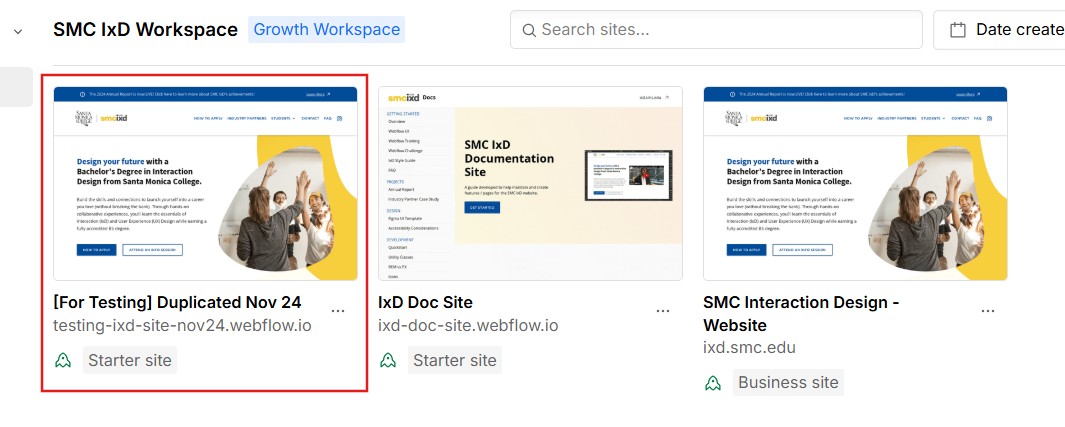
There are multiple instances of the Webflow website within the dashboard. Use the [For Testing]... project to test styles / design changes on a non-public facing website.
It is incredibly important to make sure you are on the right site. Avoid making changes to the live site if you are unsure how it will affect the site and please make a backup before making any significant changes.